
Kubernetes can use a function called a livenessProbe to help identify unhealthy pods or pods that are having issues.
The below livenessProbe uses a httpGet to check for response codes between 200 and 400. The probe waits 3 seconds (initialDelaySeconds) before starting. The probe checks for a response every 3 seconds (periodSeconds). The probe flags an unhealthy container after 3 response failures (failureThreshold), e.g. it gets three 500 server errors.
livenessProbe: httpGet: path: / port: 5000 initialDelaySeconds: 3 periodSeconds: 3 failureThreshold: 3Here is the livenessProbe in the context of my previous deployment:
apiVersion: apps/v1kind: Deploymentmetadata: name: dep-flask-hellospec: replicas: 5 selector: matchLabels: name: geektechstuff-flask template: metadata: labels: name: geektechstuff-flask spec: containers: - name: flask-hello-world image: geektechstuff/flask-hello-world:latest livenessProbe: httpGet: path: / port: 5000 initialDelaySeconds: 3 periodSeconds: 3 failureThreshold: 3 ports: - containerPort: 5000 resources: requests: cpu: 0.2 memory: 128Mi limits: cpu: 1.0 memory: 256MiUsing the describe command on a pod will show what liveness options the pod is using:
kubectl describe pod PODNAME_HERE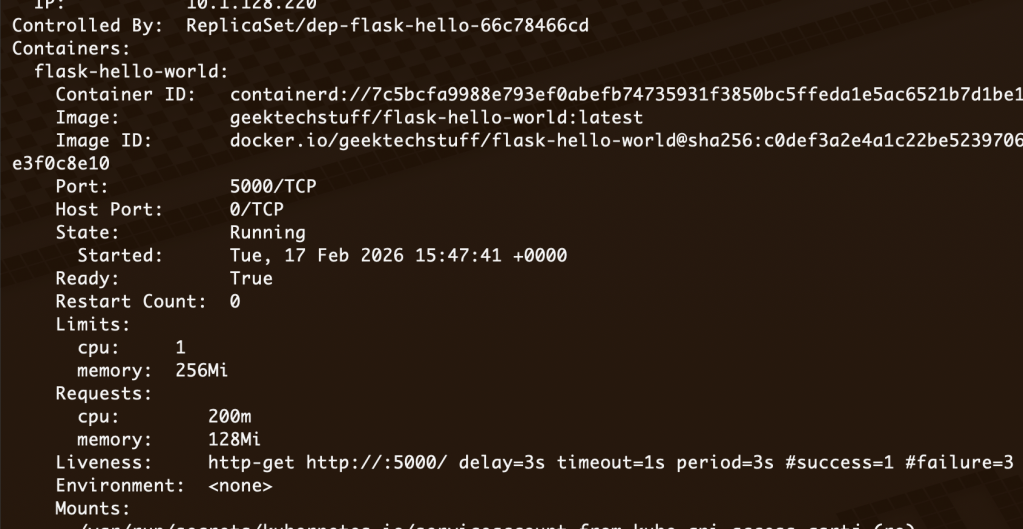
Kubernetes also offers other types of liveness probes, for example if the container does not handle HTTP requests. A tcpSocket probe may be more appropriate in these situations:
livenessProbe: tcpSocket: port: 5000 initialDelaySeconds: 5 periodSeconds: 5 failureThreshold: 3Replacing the httpGet in my previous example, the full deployment now looks like:
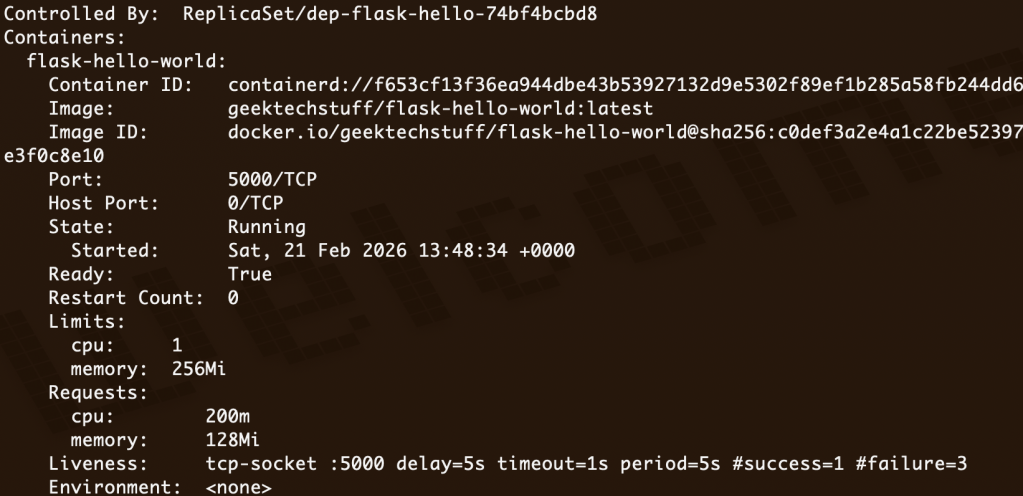
apiVersion: apps/v1kind: Deploymentmetadata: name: dep-flask-hellospec: replicas: 5 selector: matchLabels: name: geektechstuff-flask template: metadata: labels: name: geektechstuff-flask spec: containers: - name: flask-hello-world image: geektechstuff/flask-hello-world:latest livenessProbe: tcpSocket: port: 5000 initialDelaySeconds: 5 periodSeconds: 5 failureThreshold: 3 ports: - containerPort: 5000 resources: requests: cpu: 0.2 memory: 128Mi limits: cpu: 1.0 memory: 256MiA kubectl describe will now show that tcp socket is being used to check the liveness.
More information on Liveness can be found at: https://kubernetes.io/docs/tasks/configure-pod-container/configure-liveness-readiness-startup-probes/